

BLE Peripheral Simulator
by WebBluetoothCG
App that simulates a BLE Peripheral. Use to try out Web Bluetooth.
BLE Peripheral Simulator
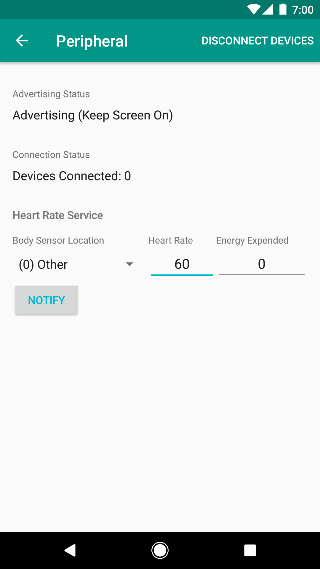
You can check the code at: https://github.com/WebBluetoothCG/ble-test-peripheral-androidDevelopers can use the app to simulate a BLE Peripheral with one of three services: * Battery Service * Heart Rate Service * Health Thermometer ServiceDevelopers can use the new Web Bluetooth features to connect to the app to Read and Write Characteristics, Subscribe to Notifications for when the Characteristics change, and Read and Write Descriptors.From the app, developers can set the characteristics values, send notifications and disconnect.Bug fixes
About BLE Peripheral Simulator
- Package name (App ID)
- io.github.webbluetoothcg.bletestperipheral
- Available on
- Google Play
- Price
- Free
- Version
- v10.0
- Updated
- March 30, 2017
- Developer
- WebBluetoothCG
Looking for the BLE Peripheral Simulator APK?
The safest way to get BLE Peripheral Simulator (io.github.webbluetoothcg.bletestperipheral) on your Android device is to install it directly from Google Play — you'll always get the latest official version, automatic updates, and no risk of modified or infected APK files from third-party sites.

Social Features
Connect and share with friends and the community.
Fitness Tracking
Track your workouts and monitor your health metrics.
Food & Dining
Discover recipes and order food from your favorite restaurants.
See BLE Peripheral Simulator in Action


What Our Users Say
Don't just take our word for it. Here's what our users have to say about this Android app.
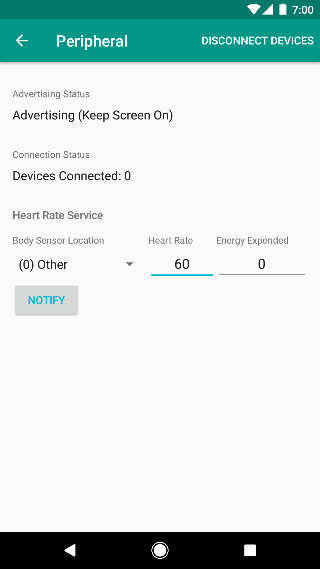
"HR always 60."
"Good that, I found this app. I am still trying to use it. Do I need to on the Bluetooth in my phone?"
"Thx, helpful app!"
"Battery service send proper data. but temperature service always send 0"
"Works great . Heart rate works as expected. Thanks!"
"Please check the heart-rate service. Its not working for me (always publish 60)"
"it would be nice if more services could be advertised ."
"Great work. Very convenient while developing. Please consider adding a continuous notify with some random values of HR data if possible."
"Pretty neat if you wanna play with the bluetooth web api. no problems using the battery peripheral. No idea how to get a reading out of the health thermometer though"
"Good app for dev"
Frequently Asked Questions
Is BLE Peripheral Simulator free?
Yes, BLE Peripheral Simulator is free to download and install on Android through Google Play.
How do I install BLE Peripheral Simulator on Android?
Open Google Play on your Android phone or tablet, search for BLE Peripheral Simulator by WebBluetoothCG or tap the Google Play button on this page, then tap Install. The app downloads and installs automatically.
What is io.github.webbluetoothcg.bletestperipheral?
io.github.webbluetoothcg.bletestperipheral is the App ID (package name) of BLE Peripheral Simulator on Google Play. Every Android app has a unique package name, and it is the safest way to verify you are installing the official app.
Is BLE Peripheral Simulator safe to download?
Installing BLE Peripheral Simulator from Google Play is the safest option: you get the official version published by WebBluetoothCG, verified by Google Play Protect, with automatic updates. Avoid APK files from unofficial third-party sites.
Get BLE Peripheral Simulator Today
BLE Peripheral Simulator for Android — free download on Google Play.
Compatible with Android phones and tablets — available on Google Play.
Ask AI about this app
Get instant answers about features, tips and more from popular AI assistants.